Case Logbook Overview
The Case Logbook provides a comprehensive, chronological audit trail of all activities and automated processes within a specific case.
There are several overviews and filtering options available to monitor administrative changes and system-level events.
Logbook Entries
This overview can be placed on the page by using Object = Logbook and View = Case Logbook.
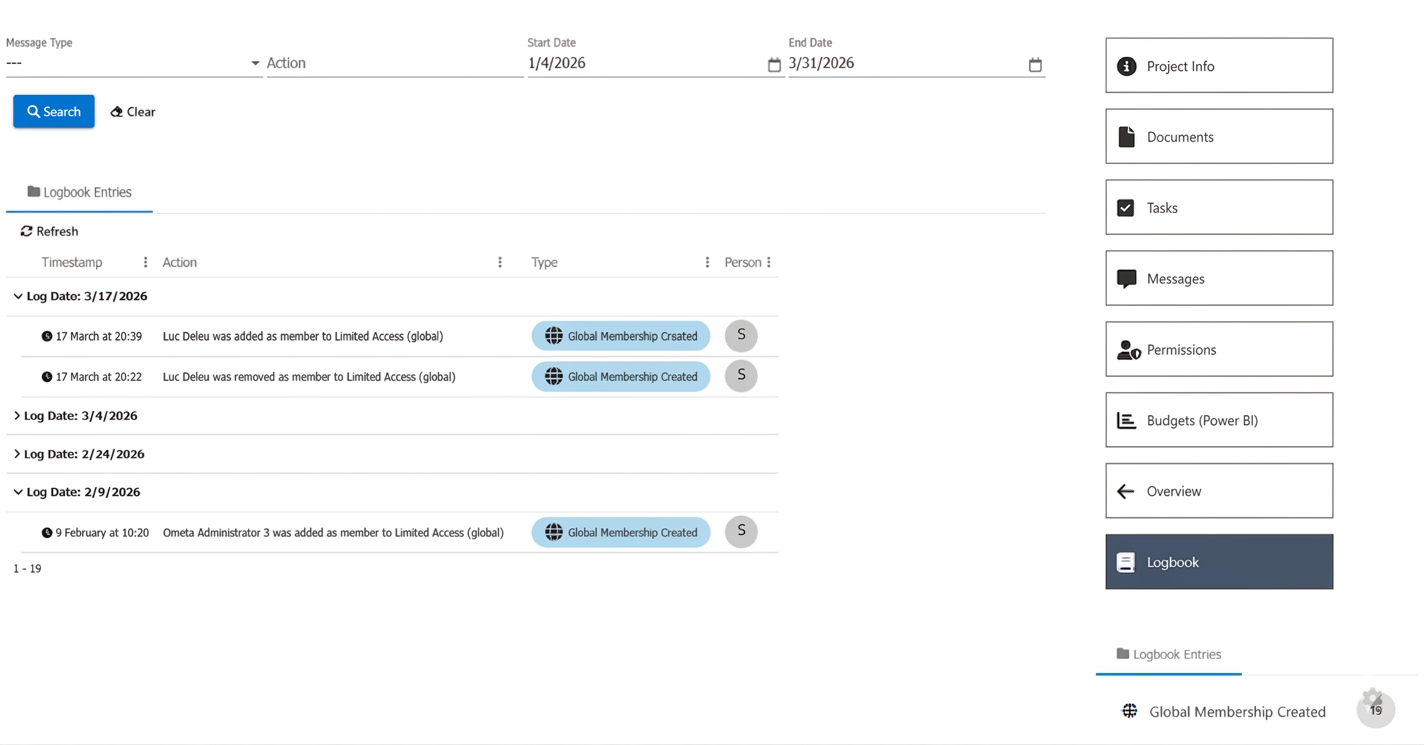
Displays all log entries related to the case in context, grouped by date.
- Fields
- Example
| Fields | Details |
|---|---|
| Timestamp | Date and Time, The exact moment the action occurred |
| Action | A description of the event or modification |
| Type | The functional category of the event, displayed with its corresponding icon & color |
| Person | The initials of the user or system account that triggered the action |
The logbook is read-only. Entries are generated automatically by the system and cannot be manually edited or deleted to ensure the integrity of the audit trail.
Logbook Filtering
There is a filter bar that facilitates searching through historical logs. Fill in one or more fields and press the "Search" button. Found in the Logbook object, Filter Case Logbook.
| Filter | Details |
|---|---|
| Message Type | Filter entries by their type |
| Action | Search for specific keywords within the action description |
| Start Date | Defines the beginning of the period to be displayed |
| End Date | Defines the end of the period to be displayed |
Activity Types
This overview shows the amount of times a certain type of message was captured. This overview is also in context of the current case (and possible filtering). Found in the Logbook object, Message Type Count By Case.
Clicking on a certain type, will open a more detailed view with the related entries.
Weekly Case Logbook Widget
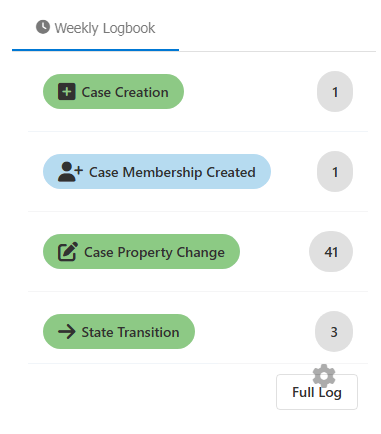
The Weekly Logbook widget provides a compact, high-level summary of activities that have occurred within the current week on this case (a daily variant is also available). It is typically placed on case-level to give users a quick "at-a-glance" view of recent changes. Clicking on a certain type, will open a more detailed view with the related entries.
- Fields
- Example
| Fields | Details |
|---|---|
| Activity Tag | A color-coded label indicating the type of system event |
| Occurrence Count | The numeric value representing how many times this event happened during the week |
| Full Log Button | A button that open a pop-up with the full logbook |