Dashboard Task overviews
Different task overviews are provided by the module. Dashboard tasks consist of all tasks of the current case's lifecycle, as well as tasks for all lifecycles that are related to the current case's lifecycle.
For all task overviews, the Due Date will be shown in red when the task is overdue.
The dashboard task overviews contain three tabbed overviews:
- My Open Tasks
- All Open Tasks
- All Closed Tasks
This overview comes in two variants:
| View | Description |
|---|---|
| All Open Dashboard Tasks Assigned to User | No case filtering; the overview shows all open tasks for which the logged in user is either task owner or assignee. No Case selection is possible when creating a case. |
| All Open Dashboard Tasks Assigned to User - With Filter | Filtering can be done by setting property DCS Case ID in context. Only tasks for set Case ID will be shown, and the Case ID will be default selected when creating a new case. Selecting another (related) case remains possible. |
My Open Tasks
This overview contains tasks for which the logged in user is either Task Owner or Assignee. If a task is assigned to or owned by a role and the user is member of this role, this task will also be shown.
The overview is grouped by priority and sorted by highest priority value.
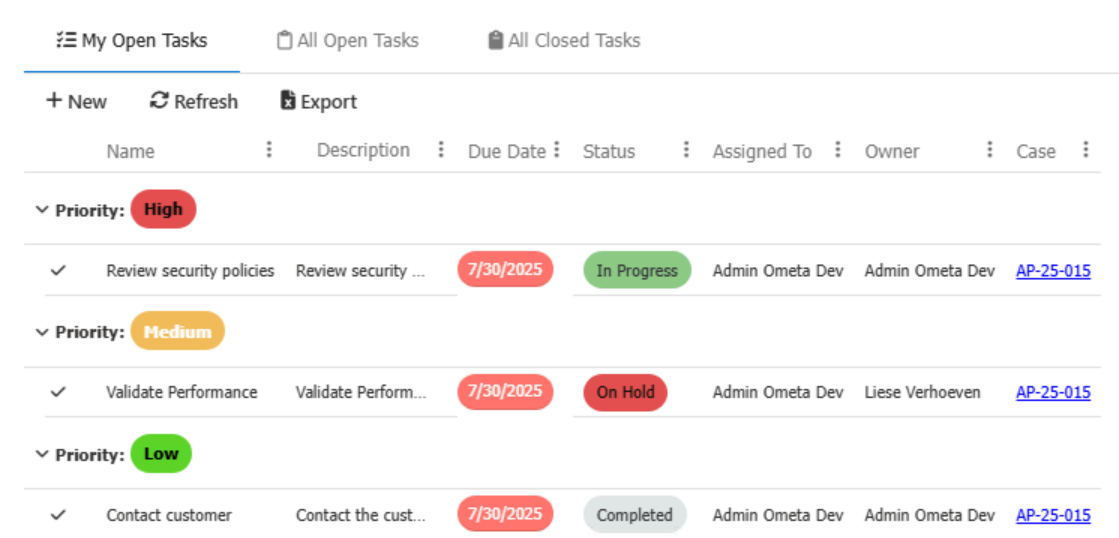
Functionality in this overview includes:
- Task details
- Create a task
- Update a task
- Close a task
- Reassign a task
- Copy a task
- View task history
- Archive a task
All Open Tasks
This overview contains all open tasks linked to relevant cases (see above), regardless of the owner or assignee. The overview offers thesame functionality as My Open Tasks.
Following functions can only be executed if the logged in user is either owner or assignee:
- Update a task
- Close a task
- Reassign a task
- Archive a task
Closed Tasks
This overview contains all closed tasks, regardless of the owner or assignee.
The overview offers limited functionality:
- Copy a task
- Task history
- Archive a task
- Restart a task (only available when the logged in user is either task owner or assignee).