Actions
What are Actions?
Actions serve as a basis for defining Templates and contain a piece of functionality in the Ometa Framework that can be used as an alert.
Technical Users can extend the solution by exposing Ometa Framework methods as new actions for end-users to use, allowing end-users to have more alerts without them having to worry about technical details of the Ometa Framework.
For an example on how to use an action in a Template and how to use a Template in an alert, click here.
Creating an Action
Only technical users can create new actions.
Actions can be managed in the 'Action Definitions' section under the 'Master Data' tab within Alert Management.
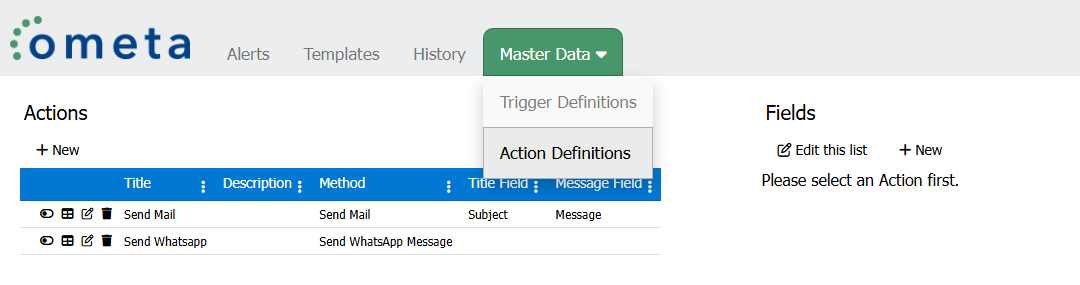
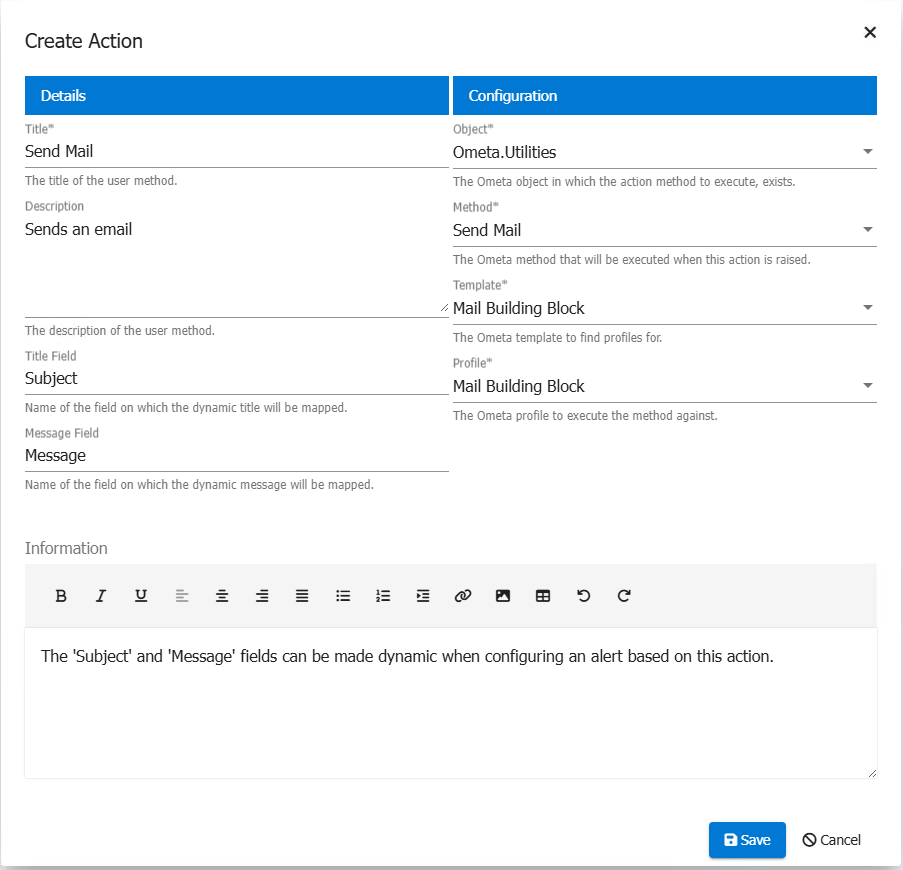
This page shows an overview of all currently configured actions that are available to end-users. New actions can be configured by clicking on the 'New' function. The following fields need to be configured:
- Fields
- Example
| Field | Required | Description |
|---|---|---|
| Title | ✔️ | A user-friendly action title. |
| Description | Description of the action. | |
| Object | ✔️ | Object within the Ometa Framework in which the method exists. |
| Method | ✔️ | Method which is executed when trigger output matches its rule set. |
| Template | ✔️ | The template to fetch profiles for. |
| Profile | ✔️ | The profile to execute this method against. |
| Title Field | Field name for which the value can be made dynamic when configuring an action. | |
| Message Field | Field name for which the value be made dynamic when configuring an action. | |
| Information | Additional information ab out the action. This will be visible in the Alerts overview. |
Configuring an Action
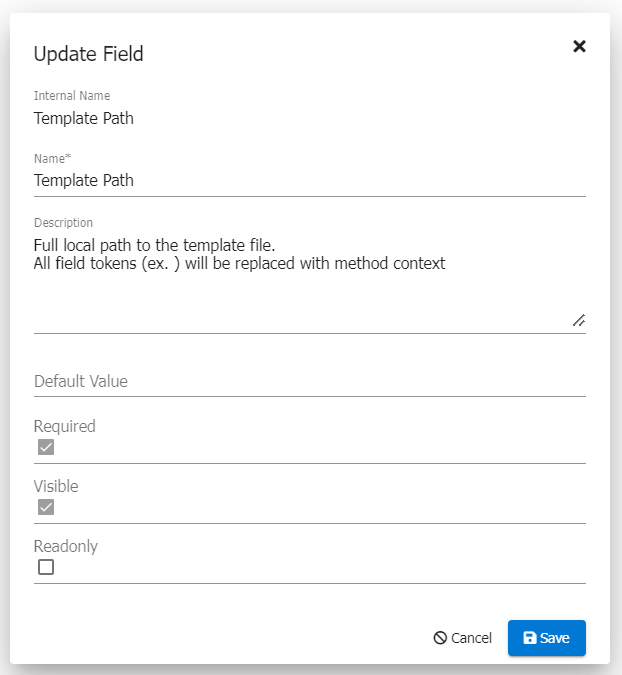
Besides creating actions a technical user can also modify which input fields an end-user can see, which fields are required and which fields are read-only. To update the fields for a given action, first set that action in context using the context setter.

All existing input fields are shown and can be updated as needed, by using the update functionality.
- Fields
- Example
| Field | Required | Description |
|---|---|---|
| Internal Name | ✔️ | The name used by the Ometa Framework to refer to this field. This is a read-only field. |
| Name | ✔️ | Name of the field that will be displayed to an end-user. |
| Description | Description of the field. | |
| Default Value | Default Value of the field, in case no value was supplied | |
| Required | Defines whether an end-user has to provide a value for this field. | |
| Visible | Defines whether this field should be shown in the list of template fields when creating a template based on this action. | |
| Readonly | Defines whether this field should be shown read only in the list of template fields when creating a template based on this action. |
Fields can only be added or updated if the action is not yet in use. If an action is already used in a template or an alert, these need to be archived or deleted first, before updating the fields.
Fields can only be deleted if these were added by technical users. Fields defined in the Ometa framework cannot be deleted.
Deleting an Action
Actions can only be deleted if they are no longer used as a basis for active alerts or templates. Deleting an action that is still in use, will result into an error. First archive or delete all alerts and templates that still use the action.
Using the delete function, an action can be removed.
