Installation
Import Installer and Solution Management
Follow the instructions of the general Installation page to set up the base configuration needed for solutions.
Assign Site Creation Permissions
By default the solution will try to create sites automatically. It is necessary to assign Sites.FullControl.All to your Ometa app registration in O365. If these permissions are not set, errors will get thrown on creation.
If your organization does not allow this, you can create the necessary portals beforehand. Make sure they are of type SITEPAGEPUBLISHING#0. You will also need to change the configuration of the Dashboard lifecycles, base and template lifecycles included after installation. Uncheck the "Ensure Case as Provisioned" and check the "Set Case As Provisioned" in the intial actions Settings tab. Also check the Created state for the same settings afterwards.
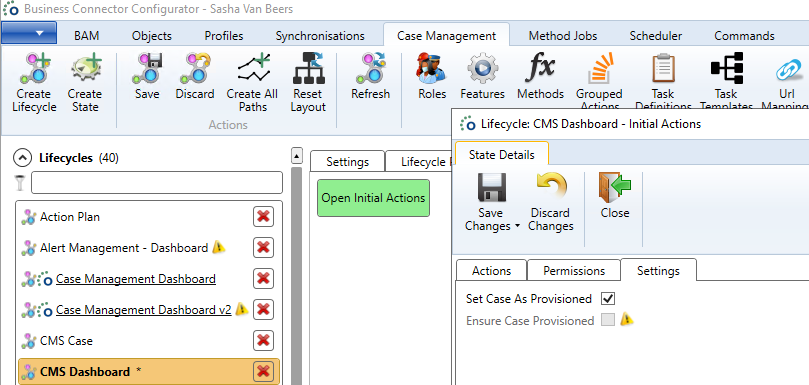
This is the only time you are allowed to change the base and template configuration.
Check App Registration Rights
The document ADM's in the solutions will use the On Behalf Of profiles which require our app registration to have delegated permissions. You can find more info in the documentation.
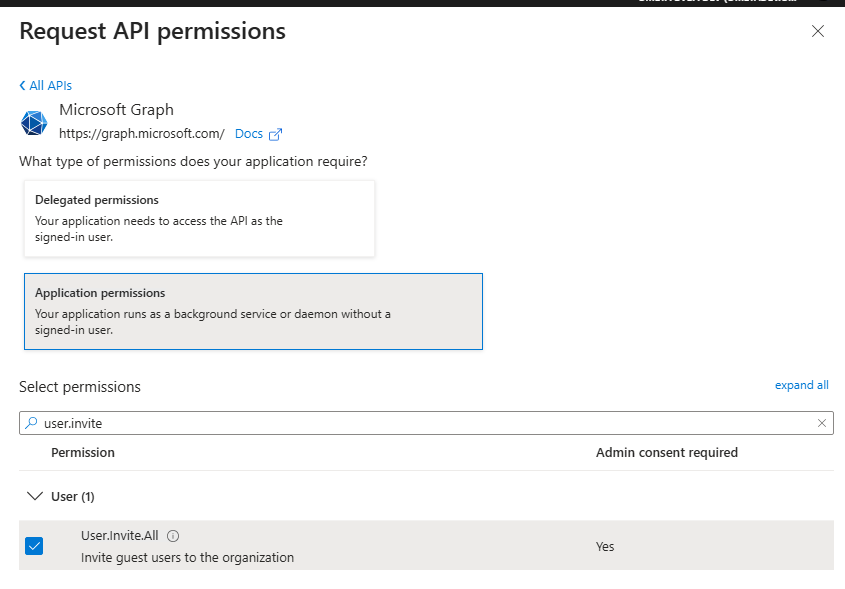
If you want to work with external users, our app registration needs the application permission User.Invite.All. Do not forget to grant Admin Consent.
Install The Solution
You can follow the instructions of Install A Solution Or Module to install the solution.
The solution name to choose when running the Install Solution method will be Case Management.
Validate Appsettings-file
When you unzip the installer package you will find the file Appsettings.json which contains all configuration variables that are used during the installation of the solution.
{
   "FrameworkExportZipName": "CMS_FrameworkConfig.zip",
   "Version" : "v3.1",
   "Scripts":[
       {
           "FileName": "SQL_CMS.sql",
           "Connectionstring": "Data Source=sqlserver;database=OmetaFramework;trusted_connection=yes;TrustServerCertificate=True"
       }
   ],
   "Methods":[
       {
           "Object": "Solution Installer",
           "Method": "Change URL Mapping",
           "Profile": "DCS ODBC",
           "InputFields":[
               {
                   "Name": "Internal Url Prefix",
                   "Value": "https://yourtenant.sharepoint.com/sites/"
               },
               {
                   "Name": "Lifecycle Name",
                   "Value": "CMS Dashboard"
               }
           ]
       },
       {
           "Object": "Solution Installer",
           "Method": "Change URL Mapping",
           "Profile": "DCS ODBC",
           "InputFields":[
               {
                   "Name": "Internal Url Prefix",
                   "Value": "https://yourtenant.sharepoint.com/sites/"
               },
               {
                   "Name": "Lifecycle Name",
                   "Value": "CMS Case"
               }
           ]
       },
       {
           "Object": "Solution Installer",
           "Method": "Change URL Mapping",
           "Profile": "DCS ODBC",
           "InputFields":[
               {
                   "Name": "Internal Url Prefix",
                   "Value": "https://yourtenant.sharepoint.com/sites/"
               },
               {
                   "Name": "Lifecycle Name",
                   "Value": "CONTRACT Dashboard"
               }
           ]
       },
       {
           "Object": "Solution Installer",
           "Method": "Change URL Mapping",
           "Profile": "DCS ODBC",
           "InputFields":[
               {
                   "Name": "Internal Url Prefix",
                   "Value": "https://yourtenant.sharepoint.com/sites/"
               },
               {
                   "Name": "Lifecycle Name",
                   "Value": "CONTRACT Case CMS CON"
               }
           ]
       },
    {
           "Object": "CMS - Case Generic",
           "Method": "Push Required Updates",
           "Profile": "SharePoint Building Blocks",
           "InputFields":[]
       }
   ]
}
Alter the following fields to your specific scenario:
- Configure the correct Connection String for the SQL script to the Ometa Solution server and update the database name if needed
- Update the Value of the input field Internal Url Prefix for the Change URL Mapping method(s) to update the included lifecycle(s) url mappings
As this is a JSON-file, special characters must be escaped. A backslash ('\') is escaped as '\'.
(Re)Import Other Modules
The Case Management Solution includes an integration to a few other modules and/or solutions:
Depending on the version you already have installed, it is possible the installer will overwrite modules with an older version. To make sure you have the most recent one, please re-install these modules.
Follow all Installation and Configuration instructions per module to ensure a fully working environment.
Post-installation Actions
Solution Config
Check the Solution Management Dashboard to see if there is Solution Configuration that needs to be updated for your environment and if there are any Solution Initialization methods configured that you need or want to execute.
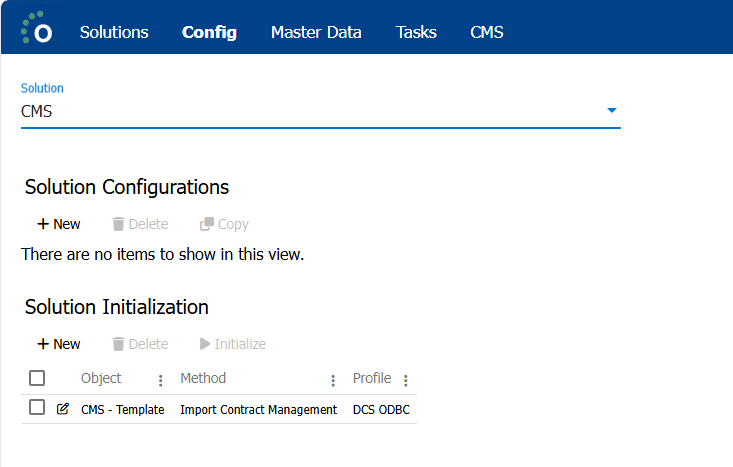
All templates released by Ometa will be visible in the Solution Initializations and can be imported by selecting one and clicking Initialize. Once a template is imported it will NOT be automatically deployed. Proceed with the steps in Configuration in order to do so.
Check Your Profiles
Check if the values in the profiles are correct and fully updated.
Profiles used in the Case Management Solution and linked modules are:
Database
- DCS ODBC
If the field Regular Expression To Replace In Error is not filled you may enter the value:
text ERROR \[42000\] \[Microsoft\]\[ODBC SQL Server Driver\]\[SQL Server\]
- Documents ADM REST
- Documents ADM SharePoint
- REST - Graph - On Behalf Of
- REST - Graph Beta - On Behalf Of
- Mail Building Block
- SharePoint Building Blocks
- SharePoint Building Blocks - On Behalf Of
- DLL Document Approval