Approval Flow
The Document Approval solution is a lifecycle so one document approval is a case (without a site). The approval has the following flow:
In Approval: the approval has started and the document is in approval.

- Approvers will be granted read permission on the document.
- The approval status field on the document will be updated to 'Pending'.
- Current changes will be checked in if the files is checked out and the file will be checked out again, so no changes can be made anymore.
- A task will be assigned to the approver(s), this task on the case will send a mail.
- A confirmation mail will be send to the user who started the flow.
Rejected: the document has been rejected.

- The approval status field will be updated to 'Rejected'.
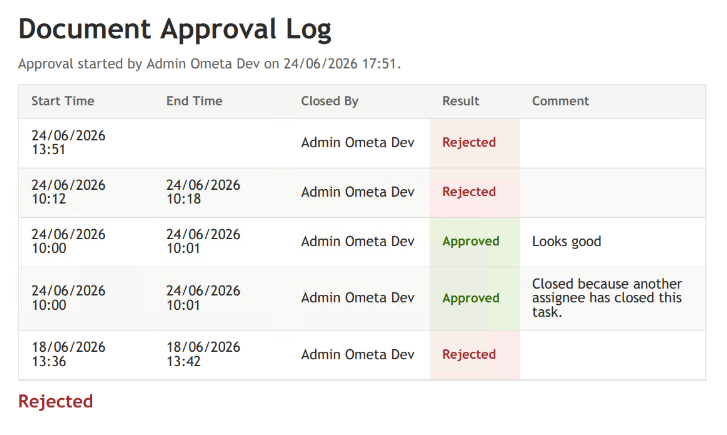
- The approval log field will be updated with the information about the approval (timestamp, user, result and comment)
- The file will be checked in again so changes can be made again.
- A mail will be send to all approvers and the user who started the approval that the document has been rejected.
Approved: the document has been approved

- The approval status field will be updated to 'Approved'.
- The approval log field will be updated with the information about the approval (timestamp, user, result and comment)
- A mail will be send to all approvers and the user who started the approval that the document has been approved.
- If the case has the approval PDF option enabled a PDF file with the original document and an approval log will be created next to the original document.
- The file will be check in and published.
Cancelled: the document approval has been cancelled

- The approval status field will be updated to 'Cancelled'.
- The approval log field will be updated with the information about the approval (timestamp, user, result and comment)
- A mail will be send to all approvers informing the approval has been cancelled.
- The file will be checked in with an overwrite so changes can be made to the document again.

Approval Types
The following approval types are currently implemented:
- Somebody must approve: the tasks are sent parallel to each approver. First approver ends the approval process.
- Everybody sequential needs to approve: the tasks are sent sequentially. First approver who rejects ends the approval process.
- Everybody needs to approve: the tasks are sent parallel to each approver, the document approval is approved when everybody has approved. First approver who rejects ends the approval process.
Approval Log PDF
When the document is approved or rejected and the option to create an approval log PDF was set an approval log PDF will be generated.
This PDF-file will be placed next to the original document with the name [original document name]_approval.pdf.
The metadata of the original document will also be set on the PDF-file.
The PDF-file contains the original document exported to a PDF and the approval log as the last page. Other approvals for the same document are also included in the log.