Conditions
What Are Conditions?
Conditions are set on a condition set, to determine for which cases quality controls need to be executed. When no conditions are set on a condition set, its mapped quality controls will never be executed.
The following fields need to be configured:
- Fields
- Example
- Operators
| Field | Required | Description |
|---|---|---|
| Condition Set | ✔️ | Readonly, shows the name of the condition set to which the condition is added. |
| Description | An optional description for the condition. | |
| Property | ✔️ | A list of lifecycle properties for the selected lifecycle. |
| Operator | ✔️ | A list of operators defining how property and value are checked. |
| Numeric | A numeric value which is checked against case property values when field ´Text´ is left empty. | |
| Text | The value to check against case property values. |
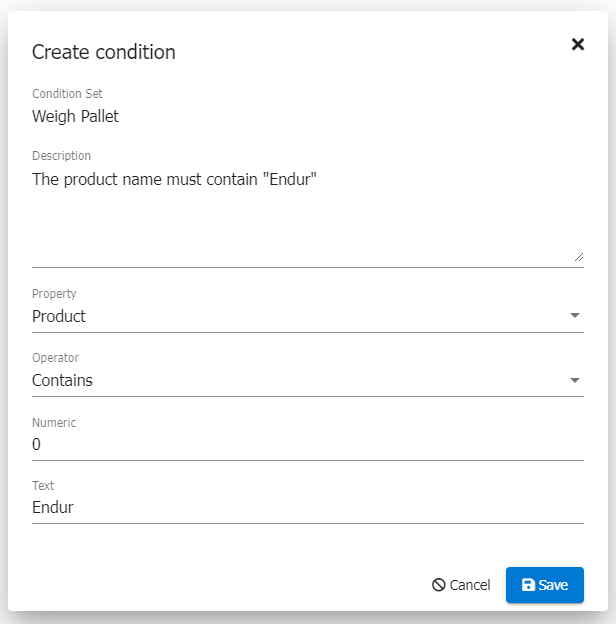
The following operators are available:
| Operator | Description |
|---|---|
| = | Compares if a property is equal to a value. |
| != | Compares if a property is not equal to a value. |
| > | Compares if a property is greater than a value. Used for numbers or dates. |
| >= | Compares if a property is greater than or equal to a value. Used for numbers or dates. |
| < | Compares if a property is less than a value. Used for numbers or dates. |
| <= | Compares if a property is less than or equal to a value. Used for numbers or dates. |
| Starts With | Checks if a property starts with a specific text. |
| Ends With | Checks if a property ends with a specific text. |
| Contains | Checks if a property contains a specific text. |
| Does Not Contain | Checks if a property does not contain a specific text. |