History
The history page will show a history of when which action was executed as a result of a trigger.
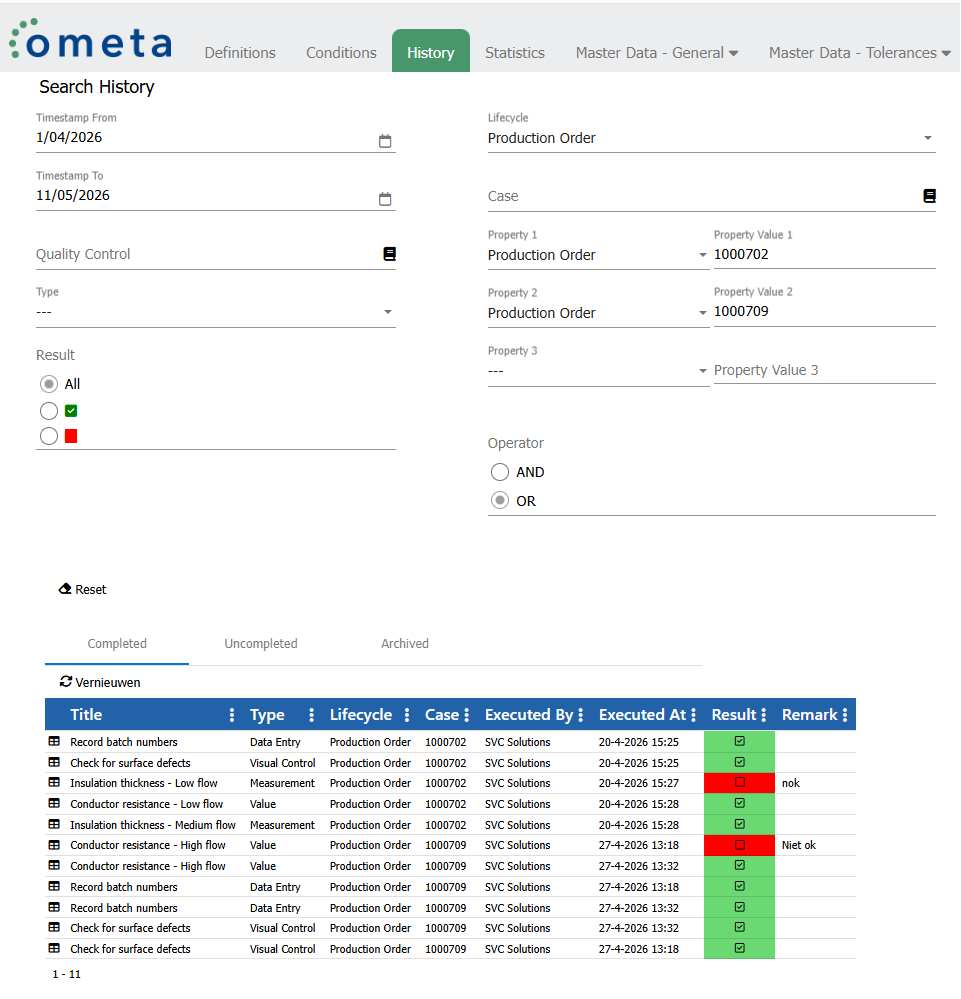
Filtering
The history can be filtered by following parameters:
| Filter | Description |
|---|---|
| Timestamp From | Filters out actions that happened earlier than the selected datetime. |
| Timestamp To | Filters out actions that happened later than the selected datetime. |
| Quality Control | Select which Quality Control should be shown. |
| Type | Select which Quality Control Types should be shown. |
| Result | Filters on the result of the quality control (All, Passed or Failed). |
| Lifecycle | Select from which lifecycle to show Quality Controls. |
| Case | Select from which case to show Quality Controls. |
| Property | Select on which case property to filter. Only properties defined within the selected lifecycle will be shown. Filters can be done using up to five properties. |
| Operator | When at least one property is selected, an operator can be selected to determine how the properties are evaluated. AND means that all properties need to match, OR means that at least one of the properties needs to match. |
History Overviews
Three separate history overviews exist:
| Overview | Description |
|---|---|
| Completed | This overview contains all historical quality controls that were fully completed. |
| Uncompleted | This overview contains all quality controls that have not been finished yet. |
| Archived | This overview contains all quality controls that were archived from the Uncompleted-overview. By doing so, a new quality control can be generated for a specific case. |