Context & Kpis
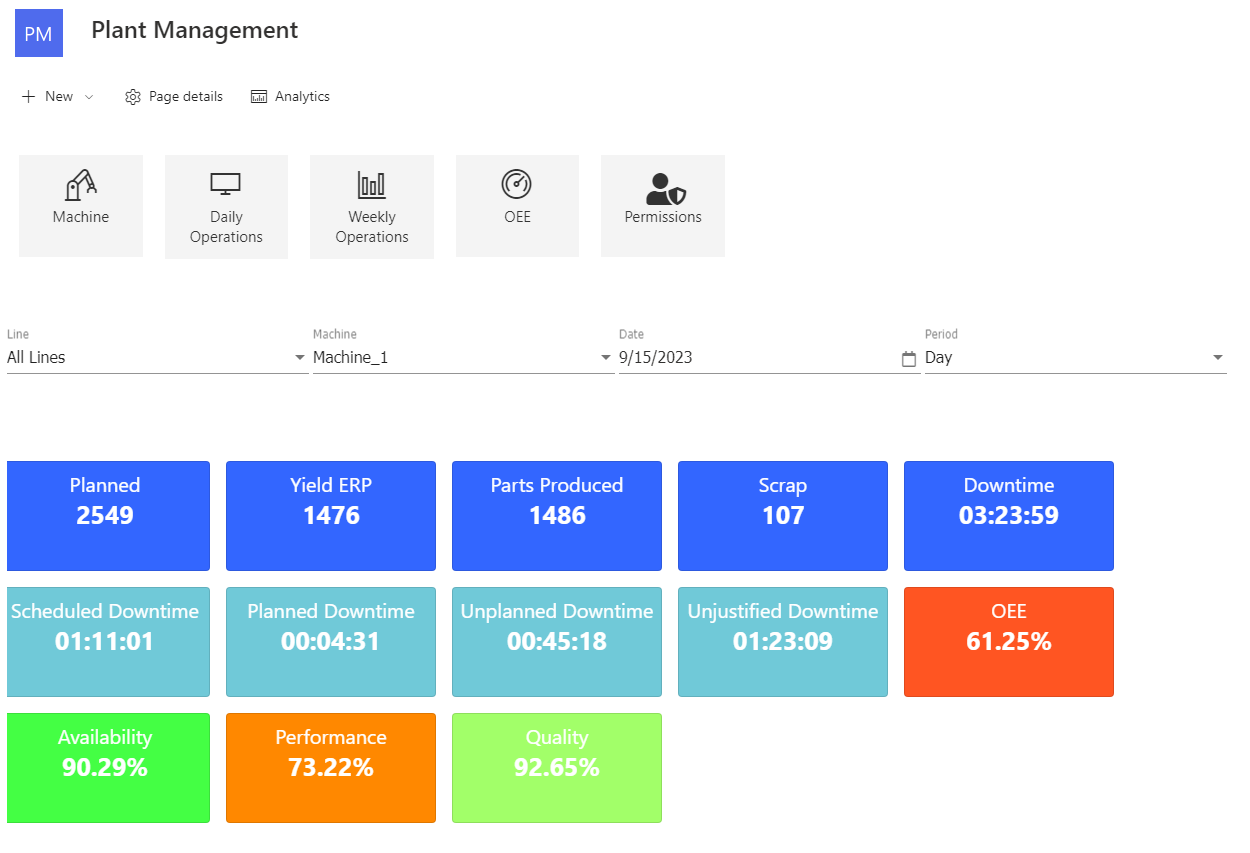
At the top of the machine details page there is a filter with which a user can select the correct machine, period and a set of KPI tiles that show all relevant information about that machine.
Context
The filter allows a user to select a specific machine, date and optionally a shift for which they want detailed information. The filter contains the following fields:
| Field | Description |
|---|---|
| Line | Select a line, no line or all lines. This filter limits the machines shown in the machine filter but has no impact on any data. |
| Machine | Select the machine for which a user wants to see the data. |
| Date | Select the date on which a user wants to see the data. |
| Period | Choose over which period the data is shown. Options are all shifts that ran on the selected day, Day, Week and Month. By default a full day is shown. If a shift is selected in this picker it will filter all views on the machine details page. Options Day, Week and Month only impact the KPI tiles at the top differently. Other views default to Day even if another option is selected. |
KPI Tiles
The tiles show all available KPIs for the selected machine on the selected Period. Tiles will be colored and labeled based on their configuration in master data. See Kpis and Thresholds for more information.
Time Interval
The KPIs are calculated based on what date and Period are selected in the filter above.
Options are:
- Shift: KPIs are calculated only for the selected shift on the selected day
- Day: KPIs are calculated from the start of the first shift until the beginning of the first shift of the next day configured on the machine on the selected date.
- Week: KPIs are calculated from the first shift on monday for the week in which the selected date falls until the beginning of the first shift for the monday following the selected week.
- Month: KPIs are calculated from the start of the first shift on the first of the selected month until the start of the first shift on the first of next month (not included).
Custom KPIs
By default the tiles show all available system KPIs. Any enabled custom KPIs will also be shown. When a user clicks on a custom KPI the following context is added before redirecting:
- OmetaFieldKPI: The KPI Label of the kpi that was clicked
- OmetaFieldMachineID: The machine identifier of the machine that is currently selected
- OmetaFieldDate: The date that was selected
- OmetaFieldPeriod: The selected period (one of a shift, day, week or month)
- OmetaFieldPeriodType: A distinguisher between "shift" and one of "day", "week" or "month". This field indicates if a shift was selected or not