Custom KPIs
The solution provides a set of default KPIs out of the box. Configurators can add custom KPIs to customize the solution to each client's needs. When a new custom KPI is created and enabled it will be displayed on the machine details tiles and the daily & weekly operations pages.
Adding a custom KPI through the masterdata dashboard will add the KPI to the relevant tiles, but it is still up to the configurator to make sure that the actual KPI values are added to the system. More information about how to add KPI values can be found in the technical documentation.
Creating a New KPI
A new KPI can be created by going to the KPIs tab on the master data and clicking + New.
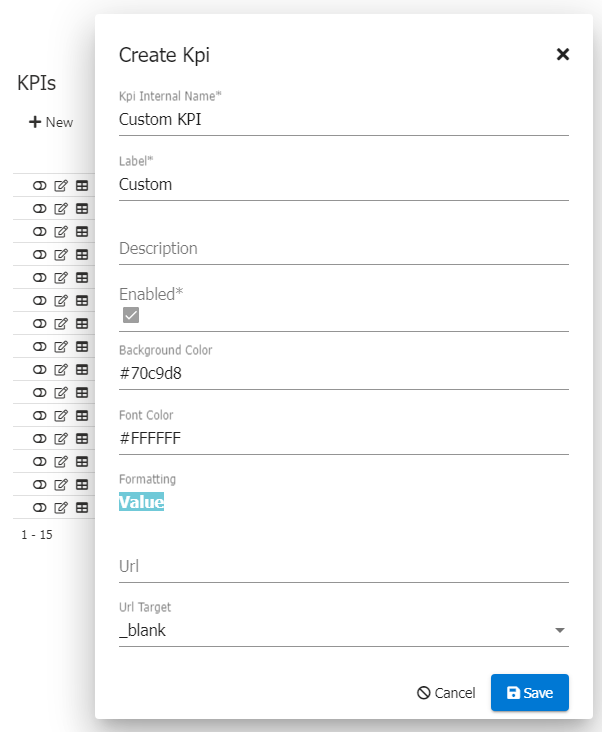
Custom KPIs have the following properties:
| Field | Description |
|---|---|
| Kpi Internal Name | A unique reference name that is used internally by the system to reference this KPI. This value can only be entered once and cannot be changed after saving. |
| Label | The label that is shown to end users for this KPI. This property allows users to customize what KPIs are called without changing the underlying references or meanings. |
| Description | An optional description of the KPI. |
| Enabled | If the KPI should be shown on dashboards or not. This only has an impact on the Machine Details and Daily & Weekly Operations pages. |
| Background Color | The default background color for the KPI tiles. This color will be used if no threshold is found for the KPI and value combination. |
| Font Color | The default font color for the KPI tiles. This color will be used if no threshold is found for the KPI and value combination. |
| Url | The url to which a user is redirected if they click on the KPI in one of the tiles. |
| Url Target | The target in which a new page will be opened if the KPI is clicked on. Available values are:
|
Thresholds
Thresholds work the same for custom KPIs as they do for system KPIs.
KPI Urls
The Url and Url Target properties allow a user to configure what should happen when a user clicks on this KPI in any of the dashboards. The clicking behavior is as follows:
- A user clicks on the KPI
- Page specific context is added to the configured Url through query parameters
- The configured url with added context is opened with the target configured in Url Target
Deleting a KPI
Only custom KPIs can be deleted. When a custom KPI is deleted it will also delete all corresponding values of KPI instances. See the technical documentation for more information.